
A Focused Approach to the NEE Unit of Instruction

Exactly why is the Unit of Instruction (UOI) considered an important piece in the evaluation of a teacher? It is valued because no teacher can be successful if they cannot plan for instruction and learning over time. Students do not learn deeply by completing isolated lessons and tasks. A teacher must be skilled at selecting learning objectives that translate into a coherent set of lessons. Without this ability, there is no sense of direction or organization that leads to academic growth.
Students learn when learning outcomes are connected to each other and chunks of curriculum are presented in a way that develops overarching topics and themes. Once this organization is planned, a teacher must be able to select instructional strategies and assessments that support the desired learning outcomes. Can you really evaluate a teacher and support their growth without assessing their ability to plan a unit of instruction?
Yet some school districts choose not to use the Network for Educator Effectiveness’ (NEE) UOI as a part of their teacher evaluation process. It has been stated by some principals and teachers that the UOI is complicated, it takes a lot of time to complete, and it is redundant. However, let’s not be too quick to condemn NEE’s UOI; after all, it is a document based on the research of effective instructional unit planning. All essential unit elements have been included, and their expectations are spot-on for effective instructional development.
The Unit of Instruction component of the NEE teacher evaluation system is intended to provide factual evidence of a teacher’s ability to turn written curriculum into instruction in a format that assists the administrator in evaluating a teacher’s unit-planning skills.
To simplify completion of the UOI organizer, could we direct teachers’ focus to those elements we believe are at the core of curricular unit planning? Is there a way to use the UOI to foster competence in instructional unit development?
Narrowing the Focus of the Unit of Instruction
NEE encourages all districts to make NEE evaluation tools and processes work to meet the needs of the district and its teachers. First, it should be noted that the NEE UOI is not an exercise in unit writing. Each district should use their usual method of unit planning. Teachers pull the elements required on the UOI organizer out of their unit and place them on the organizer to make scoring easier and more efficient for their evaluators.
If your teachers are overwhelmed with the UOI in its totality, one approach is to narrow the focus and simplify the expectations. Grow your teachers’ ability to unit plan with sophistication by deciding which elements are most important to your district and which aspects of unit planning you believe make the most impact on teaching and learning. After all, teacher evaluation is about growing teachers.
When we narrow the focus of the UOI, we should give teachers the awareness of why certain elements are selected and the explicit approval to leave the other elements blank. Only the elements that the district wants teachers to provide evidence for should be filled in, saved, and submitted.
Consider addressing the UOI elements through a series of your own questions. Let these questions dictate what goes in the UOI template. Decide which elements you would like to assess initially. Design questions to hit at the core expectations for the elements selected. Have teachers type their responses on the UOI template in the NEE Data Tool in the appropriate element boxes.
For example, if teachers are new to the UOI process or are less skilled in unit planning, possible questions that the UOI addresses could be:
- What district curriculum objectives are you including in this unit? How do these objectives work together to form a coherent unit? (UOI Element 1)
- What are three instructional strategies you will use while delivering this unit? Give an example of how you will use each of them. (UOI Element 6)
- Describe three learning activities you will use in this unit. What objectives will they address? (UOI Element 4)
- In the three learning activities you described in Element 4, how will you monitor student learning? (UOI Element 5, first box)
- Upload a copy of your summative assessment for this unit. How did this assessment align with the selected unit objectives? (UOI Element 5, third box)
- What did you learn from the summative assessment results? What does this mean for the class as a whole and individual students? (UOI Element 5, fourth box)
These questions are just an example. Your teachers may be ready for additional elements or more sophisticated questions. The NEE UOI template Includes a total of 11 elements that will help you develop the questions you want to ask. You will hit just the right balance of simplicity and rigor when you develop questions that you believe are developmentally appropriate for your teachers. One thing is certain: A feedback conversation discussing a teacher’s response to these questions has great potential to be rich, reflective, and growth-minded.
Three Clicks to Start the NEE Unit of Instruction
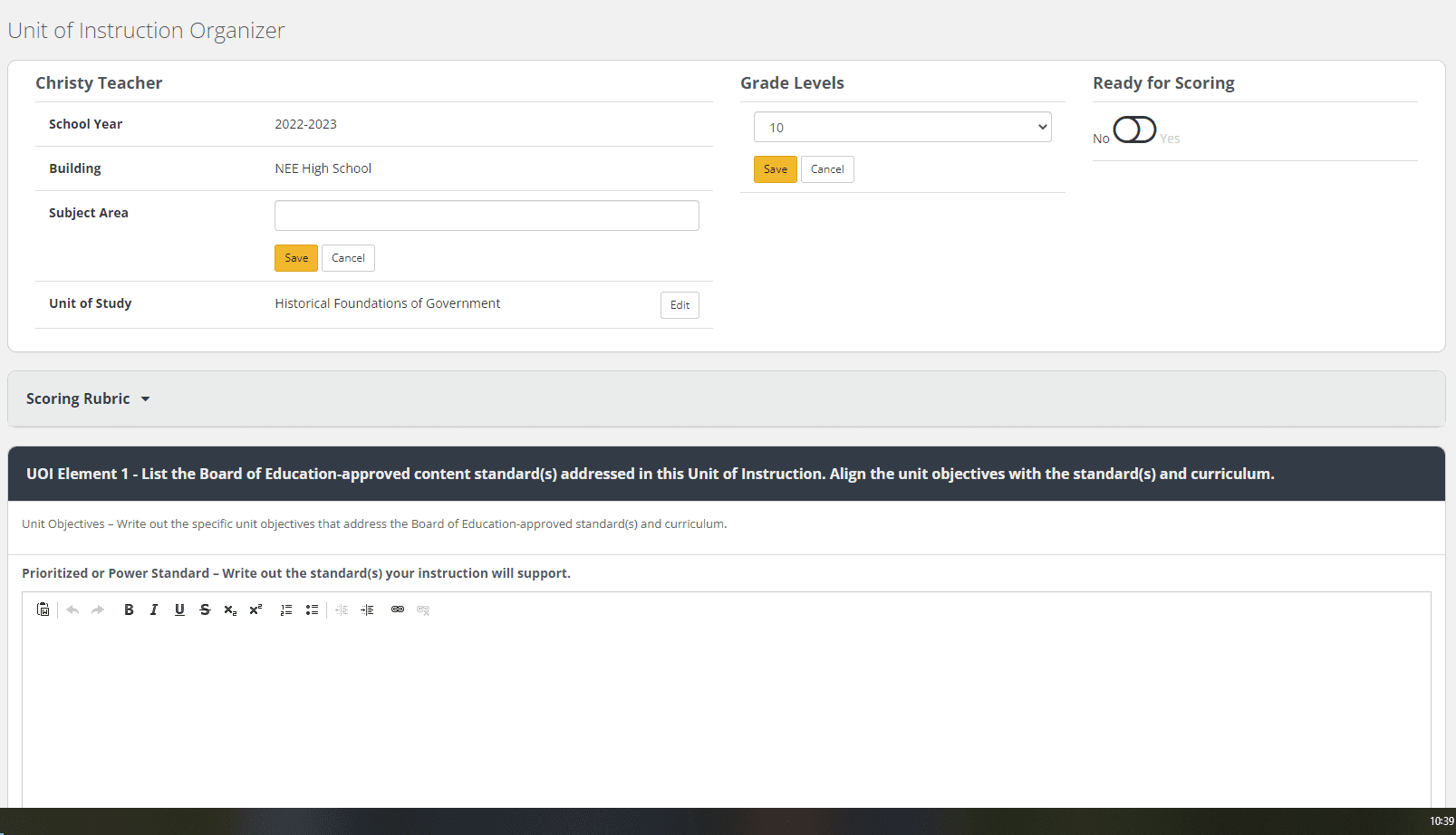
To start the UOI, the teacher clicks the My Organizer tab on the left-side menu of the NEE Data Tool and then selects Unit of Instruction. The UOI Organizer page opens displaying a list of any units created by the teacher in previous school years. The teacher clicks the New Organizer button in the upper right-hand corner to open the New Unit of Instruction Organizer creation box.
After the UOI has been created, it will be displayed on the screen. The teacher enters the unit’s subject area and selects the appropriate grade level for the unit. Notice that the Ready for Scoring button is located in this first section of the unit. It will be set to No until the teacher changes the status of the button. It is very important to note that the teacher should click Save after entering information or editing any text box on the organizer.
*Note: NEE highly recommends that teachers use the Microsoft Word document version of the UOI (available in Help and Resources) while composing their organizer. Saving this doc version locally provides a backup for the teacher’s work and prevents a situation where the teacher “times out” on the NEE site and loses their work.
Administrators can view their teachers’ units of instruction as soon as they are created by clicking on the My Teachers button on the left-side menu of the Data Tool and then selecting View Unit of Instruction Organizers from the Organizers column. When a teacher has completed a UOI, they let the administrator know by changing the Ready for Scoring button to Yes. When a UOI has been marked as ready, the administrator receives a notification on the dashboard that there is a UOI (or UOIs) ready to be scored.
Teachers who use the doc version of the organizer as they compose can login to the Data Tool to copy and paste the appropriate text into each box of the online organizer. This also allows teachers to begin work on their new units before the online organizer is available for the upcoming school year, which typically happens in early July.
Scoring the NEE Unit of Instruction
When a UOI is ready to be scored, an administrator can either click the Ready for Review button on the dashboard, access the UOI through the UOI Status Report under the Status Reports menu, or click My Teachers and then Score Units of Instruction.
Once a UOI scoring has been started, the teacher’s unit is displayed on the screen with the text the teacher entered for an element followed by the UOI scoring rubric and radio buttons that allow the administrator to score the element. A comment box is available for each element, with a General Comments box located at the end of the organizer.
At the bottom of the UOI scoring, the administrator selects either Complete (to finish scoring and notify the teacher) or Complete Later (to save the scores/comments and return to finish the scoring later). Once the UOI scoring has been completed, a report of the scores is created and is available to the teacher. The scores from the UOI will also be fed to the Summative Report.
Administrators can use the UOI Status Report, available under Status Reports on the left-side menu of the Data Tool, to keep track of progress. Once a teacher has started a UOI, their name will appear on the status report for the current school year. The status report will show administrators which UOIs are ready for scoring. The Building Activity Report shows which teachers’ UOIs have been scored.
The UOI Is one Important measure of NEE’s full teacher evaluation system, with the others being classroom observations, student surveys, and teacher professional development plans. Although schools select which NEE measures are ultimately part of their local teacher evaluation process, NEE advises that incorporating multiple measures offers administrators a more complete, accurate, and reliable view of a teacher’s strengths and areas to target for professional growth.
Additional resources about the NEE Unit of Instruction are available on the Help and Resources menu inside the NEE Data Tool:
- NEE Data Tool – Unit of Instruction (instructions for completing and scoring a unit of instruction)
- Unit of Instruction Organizer (Word Doc version of the organizer)
- Unit of Instruction Organizer – Exemplar (a high-scoring example)
- Unit of Instruction Scoring Rubric (Word Doc version of the scoring rubric)
There is also a module available In EdHub, under the NEE Training Materials topic, that describes each step of the UOI process in more detail.
Cheri Patterson is a trainer and field support representative for the Network for Educator Effectiveness. She joined NEE in 2013 after an extensive career in K-12 education as a teacher, principal, and associate superintendent.
The Network for Educator Effectiveness (NEE) is a simple yet powerful comprehensive system for educator evaluation that helps educators grow, students learn, and schools improve. Developed by preK-12 practitioners and experts at the University of Missouri, NEE brings together classroom observation, student feedback, teacher curriculum planning, and professional development as measures of effectiveness in a secure online portal designed to promote educator growth and development.