NEE Indicator Scoring Practice Videos: 10 Minutes and 32 Seconds to Better Instructional Leadership
What can you get done in just 10 minutes and 32 seconds? At home, 10 minutes and 32 seconds is plenty of time to make your bed in the morning, brew a pot of coffee, or take the dog on a short walk. At work, you might use that time to return a phone call, straighten up your desk, or answer a few emails. To be honest, several things can get done in that short amount of time.
There is another option to consider, however. If you have 10 minutes and 32 seconds, you might use the time to hone your skills as a principal by watching a video in the Indicator Scoring Practice Videos section of NEE’s EdHub Library. These short videos, which highlight eight of NEE’s most popular indicators of effective teaching practice, have an average length of 10:32. These videos provide a quick way to help building leaders improve their practice while developing teachers.
About NEE’s Indicator Scoring Practice Videos
The Indicator Scoring Practice Videos module in EdHub includes more than 80 videos that have been assigned master scores, allowing administrators the opportunity to calibrate their classroom observation skills on the following indicators:
- Indicator 1.1 – The teacher demonstrates content knowledge through the use of academic and disciplinary language and facilitates students’ accurate use of academic and disciplinary language.
- Indicator 1.2 – The teacher cognitively engages students in the content.
- Indicator 4.1 – The teacher uses instructional strategies that lead students to problem-solving and critical thinking.
- Indicator 4.2 – The teacher effectively uses appropriate instructional resources to enhance student learning.
- Indicator 5.1 – The teacher uses motivation strategies that affectively engage students.
- Indicator 5.2 - The teacher manages time, space, transitions, and activities.
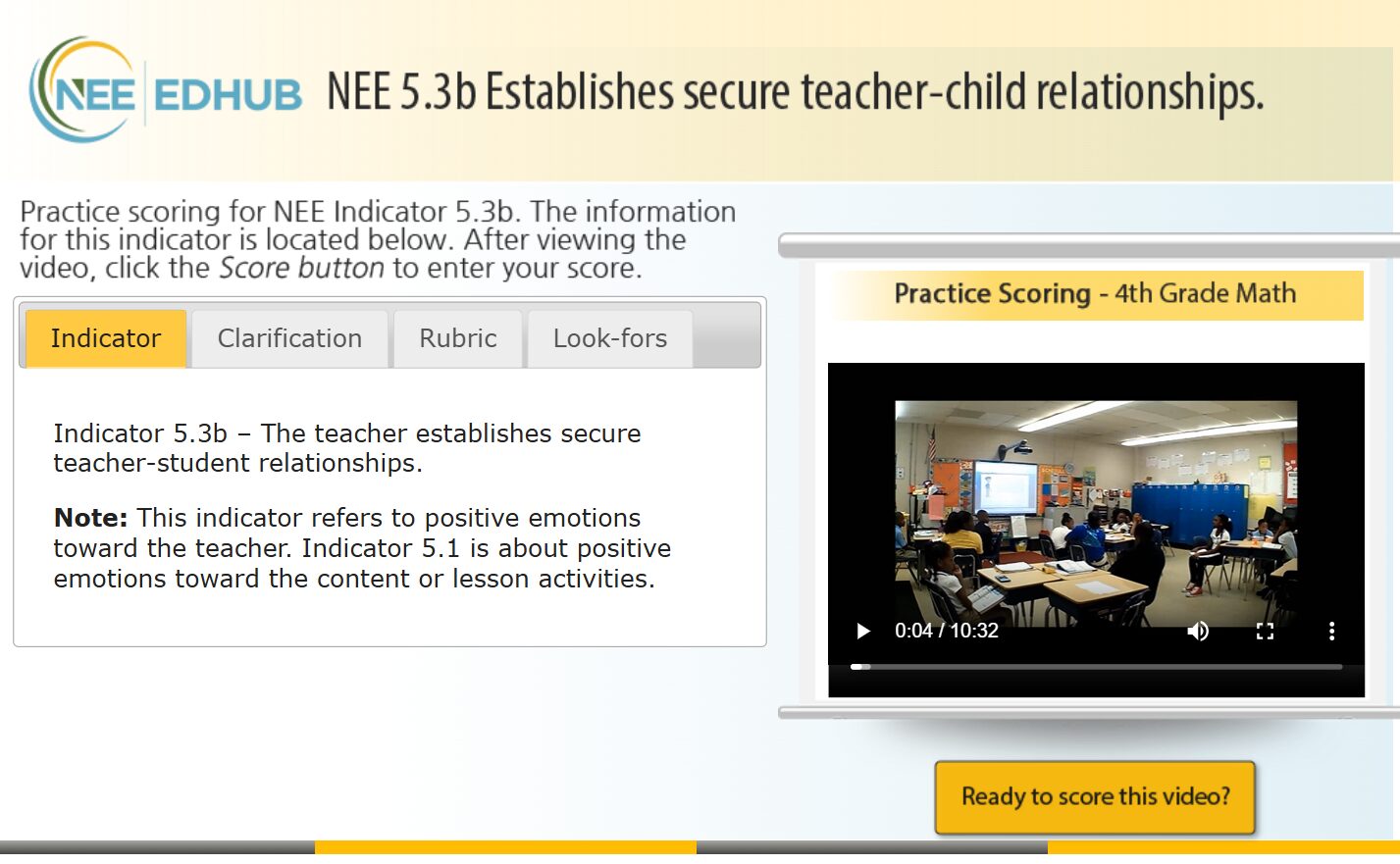
- Indicator 5.3b – The teacher establishes secure teacher-student relationships.
- Indicator 7.4 – The teacher monitors the effect of instruction on the whole class and individual learning.
How to Use NEE’s Indicator Scoring Practice Videos
To access the videos, first login to the NEE Data Tool and click EdHub on the left-side menu. In EdHub, scroll down to the topic boxes (listed alphabetically) and click on Indicator Scoring Practice Videos.
Scroll through the list of options to find a video that aligns with the indicator, grade level, and content area you wish to practice scoring.
Once a video topic is selected, the module opens and scoring essentials are briefly reviewed. These remind the user to start with a score of “3” on the rubric and move up or down based upon language found in the related scoring rubric. Next, scroll down to click on the activity, which launches the module, and watch the video clip (averaging 10 minutes and 32 seconds).
Once completed, click the gold button “Ready to score this video?” and submit a score for the indicator. Four information tabs are available to help guide the process, if needed: Indicator, Clarification, Rubric, and Look-fors. These tabs provide all the information found on the related scoring rubric.
Once a score submission is made, the master score for the video will be revealed along with a rationale for that score. This is useful information and can be very thought-provoking. If desired and time allows, you may watch the video again to further enhance calibration of your evaluation procedures.
When to Use NEE’s Indicator Scoring Practice Videos
NEE’s Indicator Scoring Practice Videos can be utilized in various ways. For instance:
- One administrator might be looking for professional development in NEE scoring procedures. This is especially important for NEE schools with a single building leader who does not have the opportunity to easily collaborate with others.
- A leadership group might be looking to create more consistent scoring across their building or district. If collaborating in actual classrooms is difficult because of time or location, consider watching one of these videos together during an upcoming administrative team meeting.
- A principal who is working with faculty might be looking for videos to help introduce or review an indicator. Building leaders can even give teachers an opportunity to score these clips to get a better understanding of the process and the indicator.
While NEE currently offers more than 80 videos for use through EdHub, we have a vast library of additional videos, and other videos can be made available upon request. If you have a need for a particular practice video, please reach out to your NEE Member Services representative or contact the NEE Help Desk at (844) 793-4357 or nee@missouri.edu.
In just 10 minutes and 32 seconds, you can sharpen your skills as an instructional leader to better evaluate, develop, and support your teachers. We’d say that’s time well-spent!
Benjy Fenske is a trainer and field representative with the Network for Educator Effectiveness. He joined NEE in 2022 after a 34-year career in education that included roles as a business teacher, FBLA sponsor, coach, principal, and superintendent.
The Network for Educator Effectiveness (NEE) is a simple yet powerful comprehensive system for educator evaluation that helps educators grow, students learn, and schools improve. Developed by preK-12 practitioners and experts at the University of Missouri, NEE brings together classroom observation, student feedback, teacher curriculum planning, and professional development as measures of effectiveness in a secure online portal designed to promote educator growth and development.